
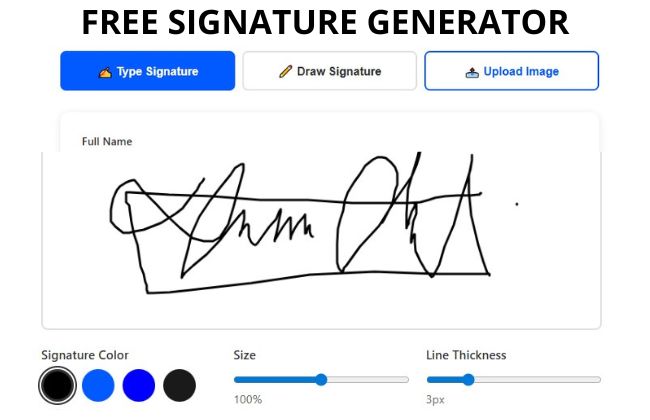
A free online signature generator offers a convenient solution, allowing users to create and apply their signatures to various documents without the hassle of printing or scanning.
Create and download your free electronic signature online. These tools can save you time and streamline your workflow.
Create Your Signature
Design a professional digital signature in seconds – Type, Draw, or Upload
Click to upload or drag and drop
PNG, JPG, or GIF (MAX. 5MB)
Signature Preview
Privacy Notice: Your signature is created entirely in your browser. We do not store, save, or share any of your signature data.
Legal Validity: Electronic signatures created with this tool are legally binding in the United States under the ESIGN Act and UETA.
What Can Be Done with This Signature Generator Tool
Our electronic signature generator is a powerful, versatile tool designed to meet all your digital signing needs. Whether you’re a business professional, freelancer, student, or individual managing personal documents, this tool provides everything you need to create electronic signatures quickly and securely.
Key Capabilities
📝 Professional Document Signing
Sign contracts, agreements, proposals, and business documents with a professional digital signature that looks authentic.
✉️ Email Signature Creation
Design personalized email signatures to add a professional touch to your correspondence and establish brand identity in every message.
📄 PDF & Document Integration
Download your signature as a PNG image with transparent background, ready to insert into PDFs, Word documents, spreadsheets, and presentations.
🎨 Custom Branding
Choose from multiple font styles, colors, and sizes to create a signature that matches your personal or corporate brand identity.
📱 Multi-Platform Use
Use your signature across all platforms – desktop applications, mobile apps, web forms, and digital documents without any compatibility issues.
🔒 Privacy Protected
All signature creation happens in your browser. Your signature data is never uploaded, stored, or shared with any servers, ensuring complete privacy.
Popular Use Cases
🏠
Real Estate
Lease agreements, rental applications, and property documents
💼
Freelance Work
Client proposals, invoices, and service agreements
🎓
Education
Permission slips, enrollment forms, and academic documents
🏥
Healthcare
Consent forms, medical releases, and insurance documents
🏦
Financial
Loan applications, bank forms, and investment documents
Complete Guide to Using the Electronic Signature Creator
Creating your perfect electronic signature is simple and takes just a few minutes. Follow this comprehensive guide to make the most of our signature generator tool.
Method 1: Type Your Signature
- Navigate to the Type Signature Tab
Click on the “Type Signature” button to access the text-based signature creator. This is the fastest method and perfect for creating clean, professional signatures. - Enter Your Full Name
Type your complete name in the “Full Name” field. You can enter your first and last name, or include middle initials for a more formal appearance. - Choose Your Signature Style
Browse through six different handwriting font styles. Click on each style to see how your name looks in different artistic formats. Select the one that best represents your personality or professional image. - Customize Your Signature
Use the customization options to adjust the signature color, size (50-150%), and appearance. The preview updates in real-time so you can see exactly how your signature will look. - Preview and Download
Review your signature in the preview section. Once satisfied, click “Download Signature” to save it as a PNG image with transparent background.
Method 2: Draw Your Signature
- Select the Draw Signature Tab
Click on “Draw Signature” to access the drawing canvas. This method provides the most authentic look, closely resembling your actual handwritten signature. - Draw on the Canvas
Use your mouse, trackpad, or touchscreen to draw your signature naturally on the white canvas. Take your time and sign as you normally would on paper. - Adjust Line Thickness
Before or after drawing, you can adjust the line thickness (1-10px) to make your signature appear bolder or more delicate, matching your natural writing style. - Use Undo and Clear Functions
Made a mistake? Click “Undo” to remove the last stroke, or “Clear” to start over completely. Practice until you’re happy with the result. - Customize and Download
Select your preferred color and size for the signature, then download it as a high-quality PNG file ready for use.
Method 3: Upload Your Signature Image
- Access the Upload Tab
Click on “Upload Image” if you already have a signature image from another source or a scanned handwritten signature. - Upload Your Image File
Either click the upload area to browse your files, or drag and drop an image directly. Supported formats include PNG, JPG, and GIF (maximum 5MB). - Apply Customizations
Once uploaded, you can change the color, adjust the size, and modify the appearance to match your document requirements. - Download the Processed Signature
Your uploaded signature will be optimized and ready for download as a standardized PNG file suitable for any document.
Pro Tip: For the most authentic appearance in professional documents, we recommend using the “Draw Signature” method. However, if you need speed and consistency, the “Type Signature” method ensures your signature looks identical across all documents.
Customization Options Explained
- Signature Color: Choose from five pre-selected colors including classic black, professional blues (#005AFF, #0000FF), and dark gray options. Color choice can affect how your signature appears on different document backgrounds.
- Size Adjustment: Scale your signature from 50% to 150% of the default size. Larger signatures work well for prominent documents, while smaller sizes are ideal for forms with limited space.
- Line Thickness: For drawn signatures, adjust the pen width from 1-10 pixels. Thicker lines create bold, confident-looking signatures, while thinner lines appear more refined and delicate.
Types of Electronic Signatures
Understanding the different types of electronic signatures helps you choose the right method for your specific needs and ensures legal compliance.
1. Simple Electronic Signatures (SES)
Simple electronic signatures are the most basic form of digital signatures. These include typed names, scanned handwritten signatures, or clicked acknowledgments. Our signature generator creates Simple Electronic Signatures that are legally binding for most common transactions.
- Easy to create and implement
- Suitable for low-risk documents
- Widely accepted for everyday business
- Cost-effective solution
- No special software or certificates required
Best For: Employment contracts, sales agreements, service contracts, NDAs, rental agreements, and general business correspondence.
2. Advanced Electronic Signatures (AES)
Advanced Electronic Signatures provide an additional layer of security by linking the signature uniquely to the signer and detecting any subsequent changes to the document. These signatures require identification verification and are created using secure signature creation software.
Key Characteristics:
- Uniquely linked to the signer
- Capable of identifying the signer
- Created using means the signer can maintain under sole control
- Linked to the data in such a manner that any subsequent change is detectable
Best For: Financial transactions, corporate agreements, contracts with significant monetary value, and documents requiring higher security standards.
3. Qualified Electronic Signatures (QES)
Qualified Electronic Signatures represent the highest level of electronic signature security. These signatures are created using a qualified signature creation device and are based on a qualified certificate for electronic signatures. While more common in the European Union under eIDAS regulation, QES provides the maximum legal weight.
Requirements:
- Issued by a qualified trust service provider
- Based on a qualified certificate
- Created with a qualified signature creation device
- Strong identity verification process
- Equivalent to handwritten signatures in all legal contexts
Best For: Government documents, high-value transactions, regulated industries, cross-border agreements, and situations requiring the highest level of legal assurance.
Signature Styles: What Your Handwriting Says About You
Your signature is more than just a legal mark; it is a visual representation of your public persona. Graphologists suggest that the way you sign your name can reveal significant insights into your character, confidence, and social approach.
1. The Bold & Oversized
Personality Traits: Confident, outgoing, and perhaps a bit dramatic. You have high self-esteem and don’t mind being the center of attention.
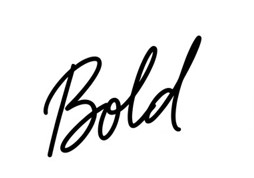
A large, expansive signature with strong, thick strokes that dominate the space, reflecting a vibrant and authoritative personality.
2. The Illegible Scribble
Personality Traits: Fast-thinking, efficient, and private. You likely value results over process and prefer to keep your personal thoughts guarded from strangers.

A rapid, abstract motion where individual letters are indistinguishable, suggesting a sharp mind that moves faster than the hand can follow.
3. Underlined Mark
Personality Traits: Disciplined, organized, and self-assured. The underline acts as a foundation, showing you are grounded and crave a sense of importance.

Legible script supported by a firm, horizontal base. This style signals a person who takes responsibility seriously and possesses strong leadership qualities.
4. Ascending Slant
Personality Traits: Optimistic, ambitious, and forward-looking. You likely have high aspirations and a positive outlook on your future endeavors.
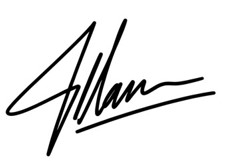
The text climbs toward the top right corner of the page, visually representing a drive for success and an energetic, “glass half-full” mentality.
5. The Descending Slant
Personality Traits: Realistic, cautious, or currently fatigued. While it can signal pessimism, it often simply reflects a grounded, practical nature that weighs risks carefully.

The script gradually dips toward the bottom right. This often characterizes individuals who are skeptical, weary, or deeply focused on practical realities rather than dreams.
6. The “Initial-Only” Style
Personality Traits: Professional, busy, and focused on privacy. You prefer to keep your “true self” for your inner circle while maintaining a formal exterior.
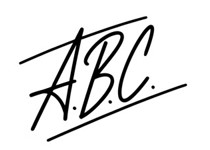
A minimalist approach using only initials. It reflects someone who is direct, values their time immensely, and maintains a clear boundary between work and home.
7. Encircled Signature
Personality Traits: Protective, sensitive, or defensive. You may feel a need for security or a desire to “cocoon” yourself from the outside world.

The name is housed within a protective loop or circle. This suggests a personality that is cautious with trust and highly protective of their personal space.
8. The Perfectly Legible Script
Personality Traits: Transparent, honest, and traditional. You have nothing to hide and value clear communication and social etiquette.

Exquisitely clear handwriting that mirrors standard cursive. It indicates a person who is open, straightforward, and respects established rules and social conventions.
9. The Sharp & Angular
Personality Traits: Intense, intelligent, and assertive. You likely possess a competitive edge and a highly analytical mind that cuts through distractions.

A series of aggressive, pointed strokes without rounded curves. This style belongs to those with strong willpower, high intelligence, and a potentially stubborn streak.
Frequently Asked Questions
Yes, absolutely! Our signature generator is 100% free with no hidden costs, subscriptions, or premium features. Create unlimited signatures, download as many times as you need, and use all customization options without any charges or registration requirements.
No, never. All signature creation happens entirely in your browser. Nothing is uploaded, stored on servers, or transmitted anywhere. Your signature remains completely private and under your sole control. We cannot access your signature data at all.
Your signature downloads as a PNG image file with a transparent background. This format is universally compatible with all document types, including PDFs, Word documents, Excel spreadsheets, PowerPoint presentations, and email signatures across all platforms.
After downloading your signature PNG, open your PDF in Adobe Acrobat, Preview (Mac), or any PDF editor. Use the “Insert Image” or “Add Signature” feature to place your signature file where needed. The transparent background ensures seamless integration.
Choose “Type” for speed and consistency across documents. Use “Draw” for the most authentic, handwritten appearance that closely resembles your real signature. Select “Upload” if you already have a scanned signature image you want to optimize and standardize.
Absolutely! You can create as many signature variations as you need, completely free. Try different fonts, colors, sizes, and styles. Download each version for different purposes—formal business signatures, casual email signatures, or creative personal signatures.
Yes, the signature generator is fully responsive and works perfectly on all devices. On touchscreen devices, you can draw your signature naturally with your finger or stylus. All features, including customization options and downloads, function seamlessly on mobile.
No registration required! Start creating signatures immediately without providing any personal information, email address, or payment details. The tool is completely anonymous and accessible instantly. Just visit, create, customize, and download—that’s it. No strings attached.
Related Articles: